
Use Trendtrack with ChatGPT
Connect ChatGPT to the Trendtrack public API through Trendtrack's remote MCP endpoint for live brand, ad, shop, and workspace analysis.
ChatGPT can connect to Trendtrack through a custom MCP app using Trendtrack's remote MCP endpoint.
https://api.trendtrack.io/v1/mcpSetup
Make sure Public API access is enabled for your workspace before connecting ChatGPT. If needed, follow Authentication first.
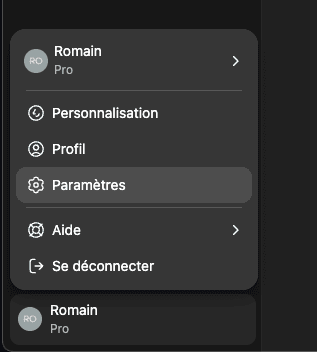
In ChatGPT, click your profile in the bottom-left corner, then click Settings.
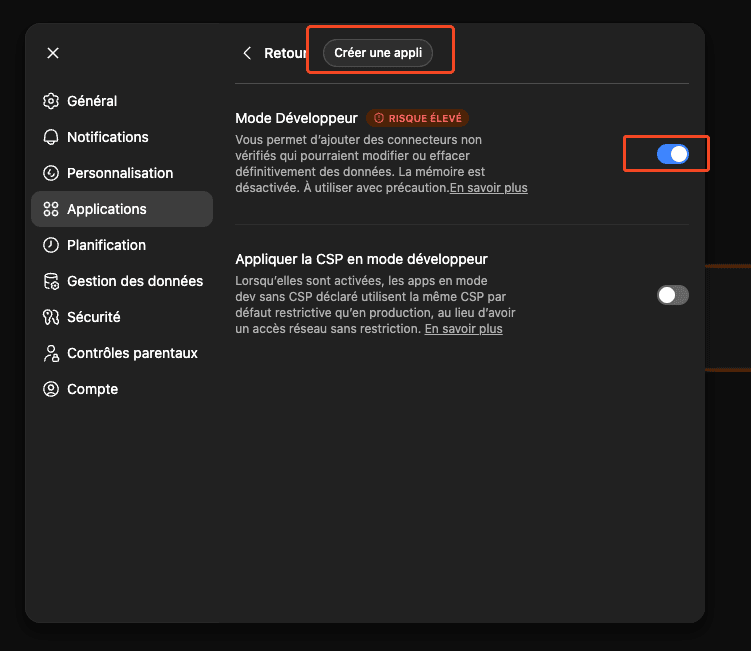
Go to Apps, then open Advanced settings.
Enable Developer mode, then click Create an app.
Set the app name to Trendtrack, set/paste the MCP server URL to https://api.trendtrack.io/v1/mcp, then click Create.
On Trendtrack, click Allow access to complete OAuth.
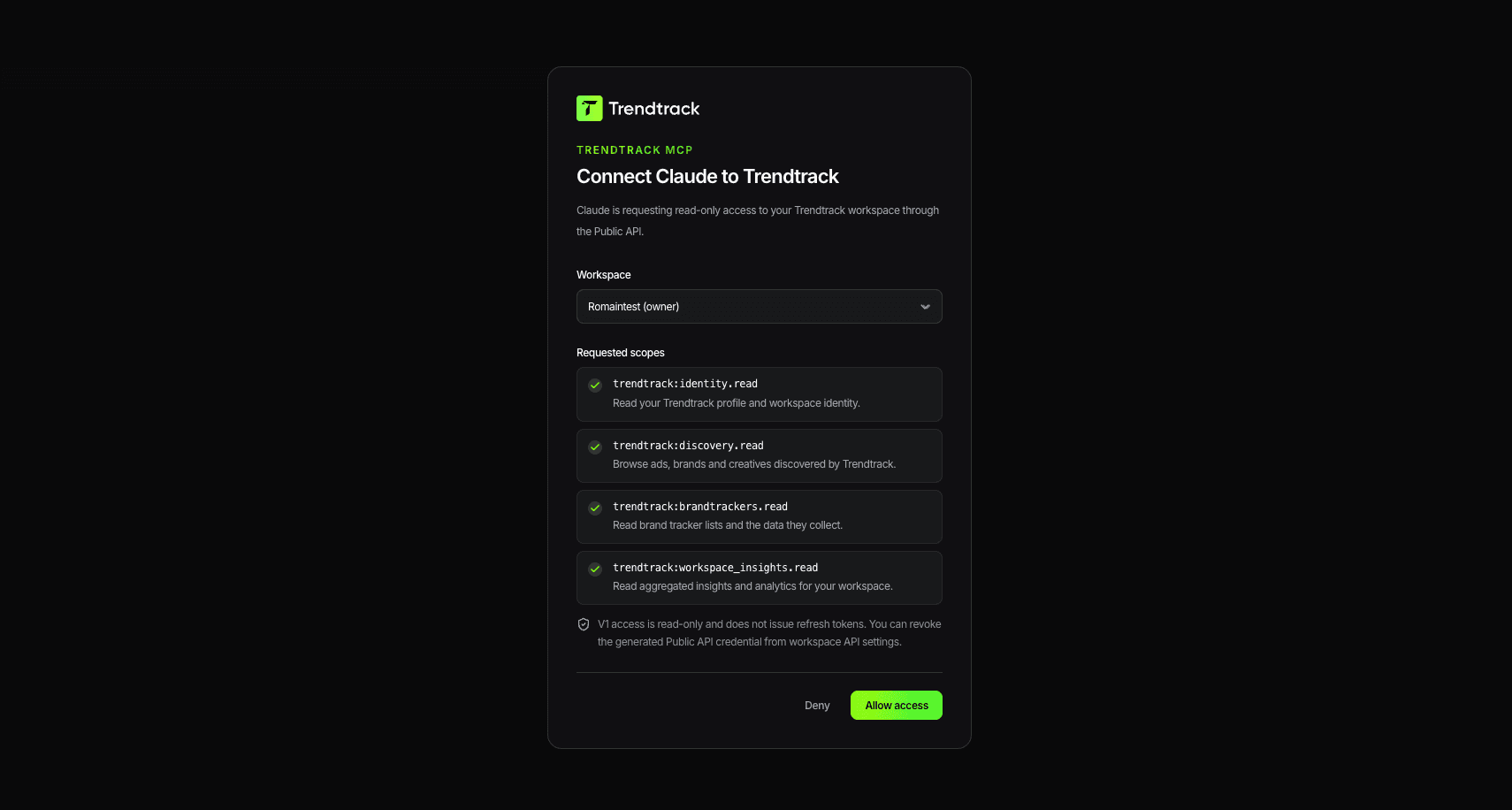
Trendtrack is then available inside ChatGPT.
Example prompts
- Find Shopify stores selling skincare in France with active Meta ads and summarize any TikTok presence fields.
- Search TikTok library creatives for collagen gummies; include ads and organic videos.
- Look up this brand and summarize its current top Meta ads.
- Show my workspace's fastest scaling ads this week.
- Check remaining usage credits before running a large query.
For TikTok creative discovery, ask ChatGPT to use search_tiktok_library. For shop questions, search_shops can include additive TikTok presence/count fields, but linked advertisers and /v1/ads* remain Meta/Facebook-only.
If you are mirroring the same workflow over REST, use the dedicated TikTok endpoints:
GET /v1/tiktok/library?search=collagen%20gummies&type=all&limit=10
POST /v1/tiktok/library/query {"search":["collagen gummies"],"type":"ad","status":"active","limit":10}
GET /v1/tiktok/library/tiktok_7078586231734521093
GET /v1/shops/3f8aa146-6f96-46e8-9781-64db5166f9a8/tiktok/library?limit=10
Brandtracker write examples
Once you approve the trendtrack:brandtrackers.write OAuth scope, ChatGPT can manage tracked brands through MCP write tools. API-key MCP callers are workspace-authorized like REST API keys and do not use OAuth scopes.
Use Trendtrack add_to_brandtracker with domain "examplebrand.com" and folder_id 42.Use Trendtrack create_brandtracker_folder named "Q3 competitors", then move_tracked_brands with brandtracker_ids ["..."] and folder_id from the created folder.Use Trendtrack delete_brandtracker_folder with folder_id 42, action "move_to_default", confirm true. Only use action "delete_tracked_brands" when I explicitly want the tracked brands deactivated.Favorites write examples
The default OAuth grant includes trendtrack:favorites.read so ChatGPT can use list_favorites, and trendtrack:favorites.write for favorites MCP write/share tools. Write tools include create_favorite_folder, update_favorite_folder, set_favorite_folder_visibility, delete_favorite_folder, reorder_favorite_folders, add_favorite_item, move_favorite_item, remove_favorite_item, create_ad_share_link, and create_favorite_folder_share_link.
Use type: "ads" | "shops" | "emails"; shops means website/shop favorites. scope defaults to workspace, while personal requires delegated-user authorization. Destructive tools such as delete_favorite_folder and remove_favorite_item require confirm: true.
Use Trendtrack create_favorite_folder with type "shops", name "Competitor shops", then add_favorite_item with type "shops", item_id "...", and folder_id from the created folder.Use Trendtrack delete_favorite_folder with type "ads", folder_id "...", mode "move_items_to_root", confirm true.Use Trendtrack create_favorite_folder_share_link with type "ads" and folder_id "...". Shops and emails are not shareable through MCP in this version.Favorite capabilities: ads support hierarchy, reorder, visibility, and share links; shops support flat folders and visibility but not hierarchy/reorder; emails support hierarchy, reorder, and visibility. Saved favorite IDs come from list_favorites: ads are numeric, shops/emails are UUIDs.
For public ad scaling prompts like “top ads leggings femme sur les 7 derniers jours”, ask ChatGPT to use the generated POST /v1/ads/query 7-day scaling example (reachDelta7d, last7d, minReach: 1) rather than first-seen date filters.
Cost and safety notes
- Start with read-only discovery endpoints like
/v1/me,/v1/workspace,/v1/usage, and/v1/lookup. - Read/list metered endpoints consume credits per returned row; write/share mutations are usually fixed-cost one-credit calls.
- Brandtracker create/reactivate and destructive delete operations also check brandtracker mutation quota and active tracker slots before committing changes.
trendtrack:favorites.readis part of the default OAuth grant forlist_favorites;trendtrack:favorites.writeis opt-in and required only for favorites write/share tools. API-key MCP callers rely on REST-style workspace authorization.- Destructive MCP tools require
confirm: true; bulk and folder destructive operations count as one persistent create/delete quota operation while reporting affected counts. - See Credits & Billing and Rate Limits before running large queries.
Troubleshooting
- ChatGPT can't create the app: confirm Developer mode is enabled in Apps advanced settings.
- The app can't connect: confirm the MCP URL is the canonical extension-server
/v1/mcpendpoint:https://api.trendtrack.io/v1/mcp. - ChatGPT can't access workspace data: reconnect the app and complete OAuth again.
- Unexpected credit usage: ask ChatGPT to check usage first and run smaller limits.
- 429 rate limits: wait and retry according to Rate Limits.