
Utiliser Trendtrack avec Claude
Connectez Claude à la Public API Trendtrack via l'endpoint MCP distant de Trendtrack pour analyser en direct les marques, publicités, shops et données d'espace de travail.
Claude can connect to Trendtrack through a custom connector using Trendtrack's remote MCP endpoint.
https://api.trendtrack.io/v1/mcpSetup
Make sure Public API access is enabled for your workspace before connecting Claude. If needed, follow Authentication first.
In Claude, open Settings and go to Connectors.
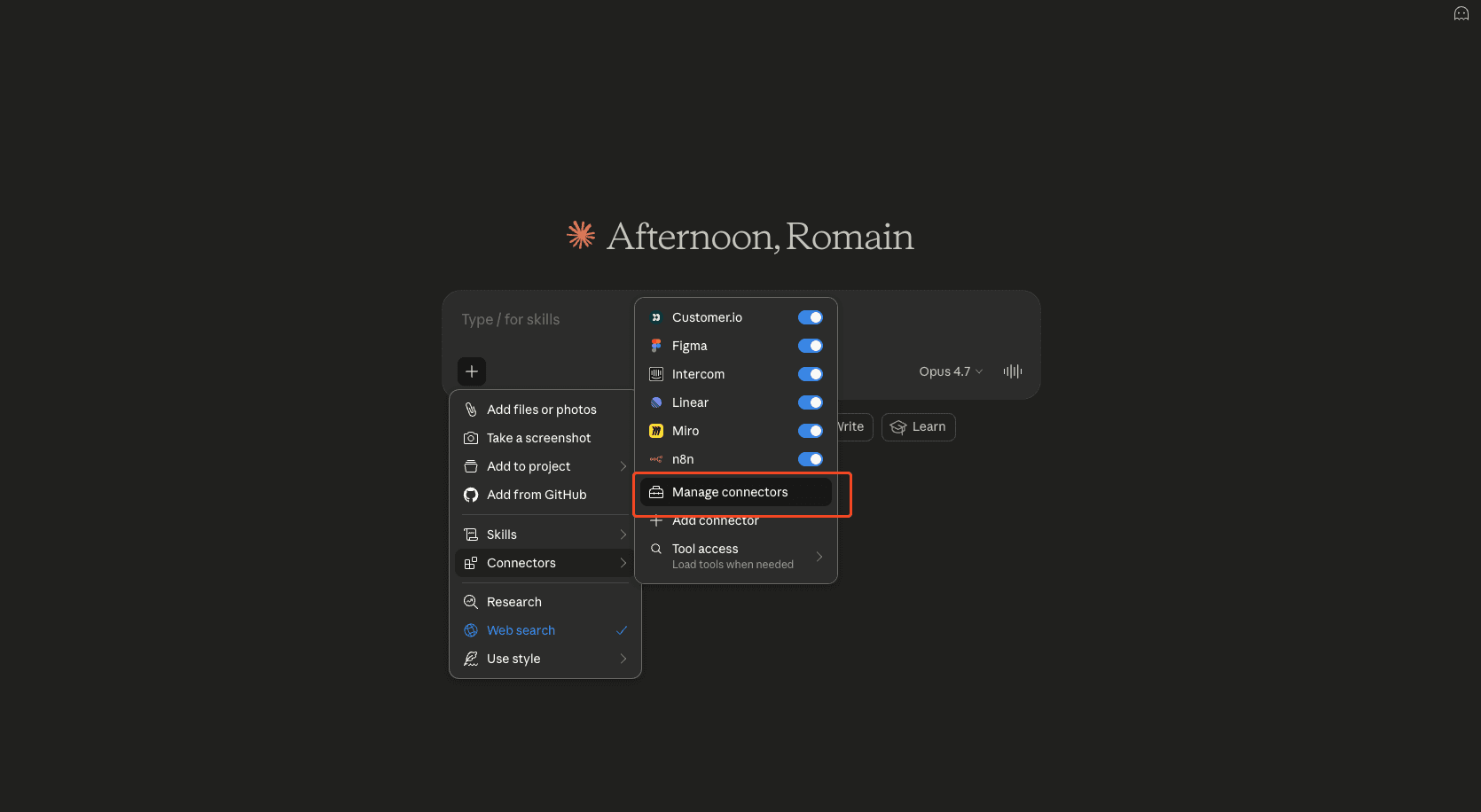
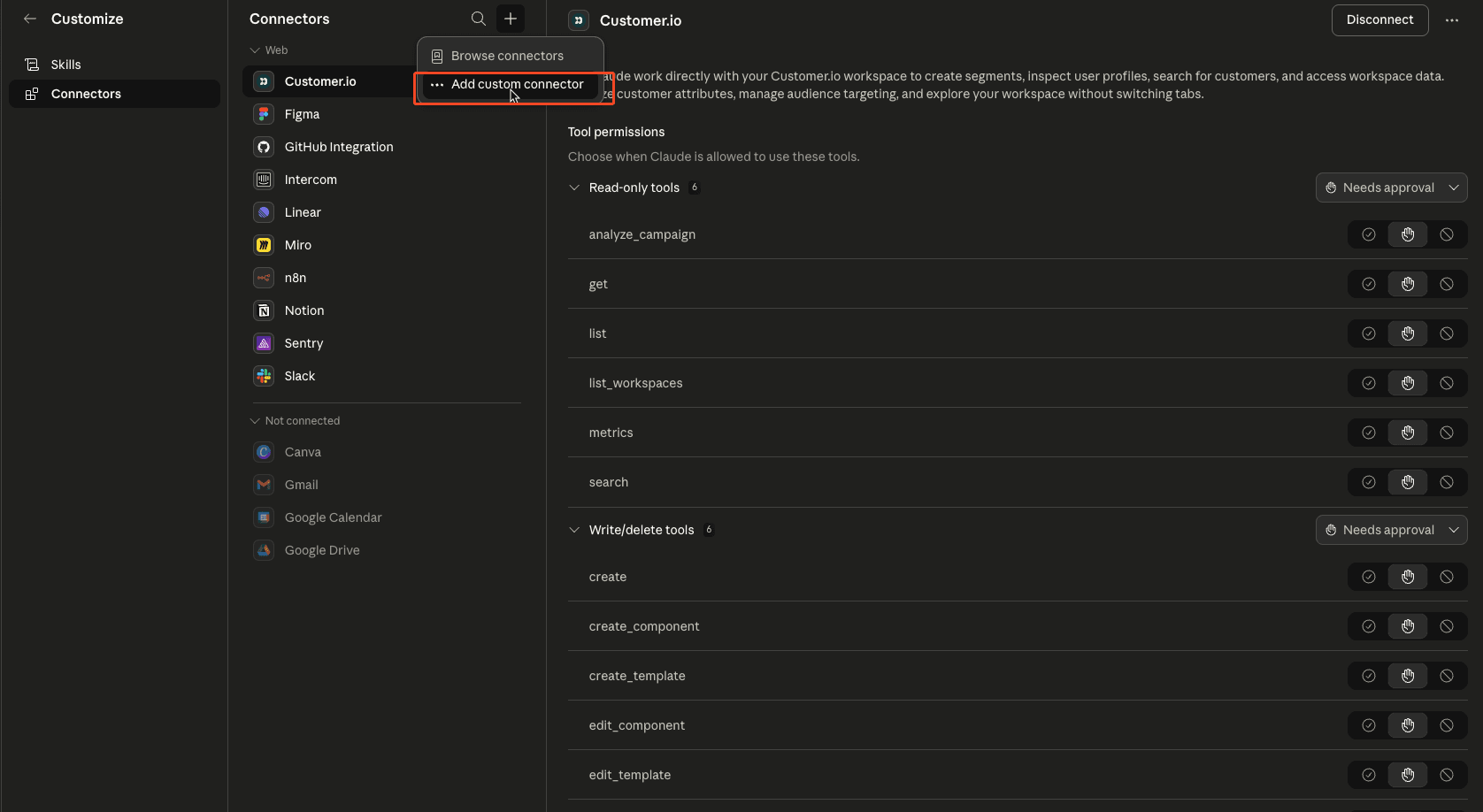
Click Add custom connector, set the name to Trendtrack, set/paste the Remote MCP server URL to https://api.trendtrack.io/v1/mcp, then click Connect.
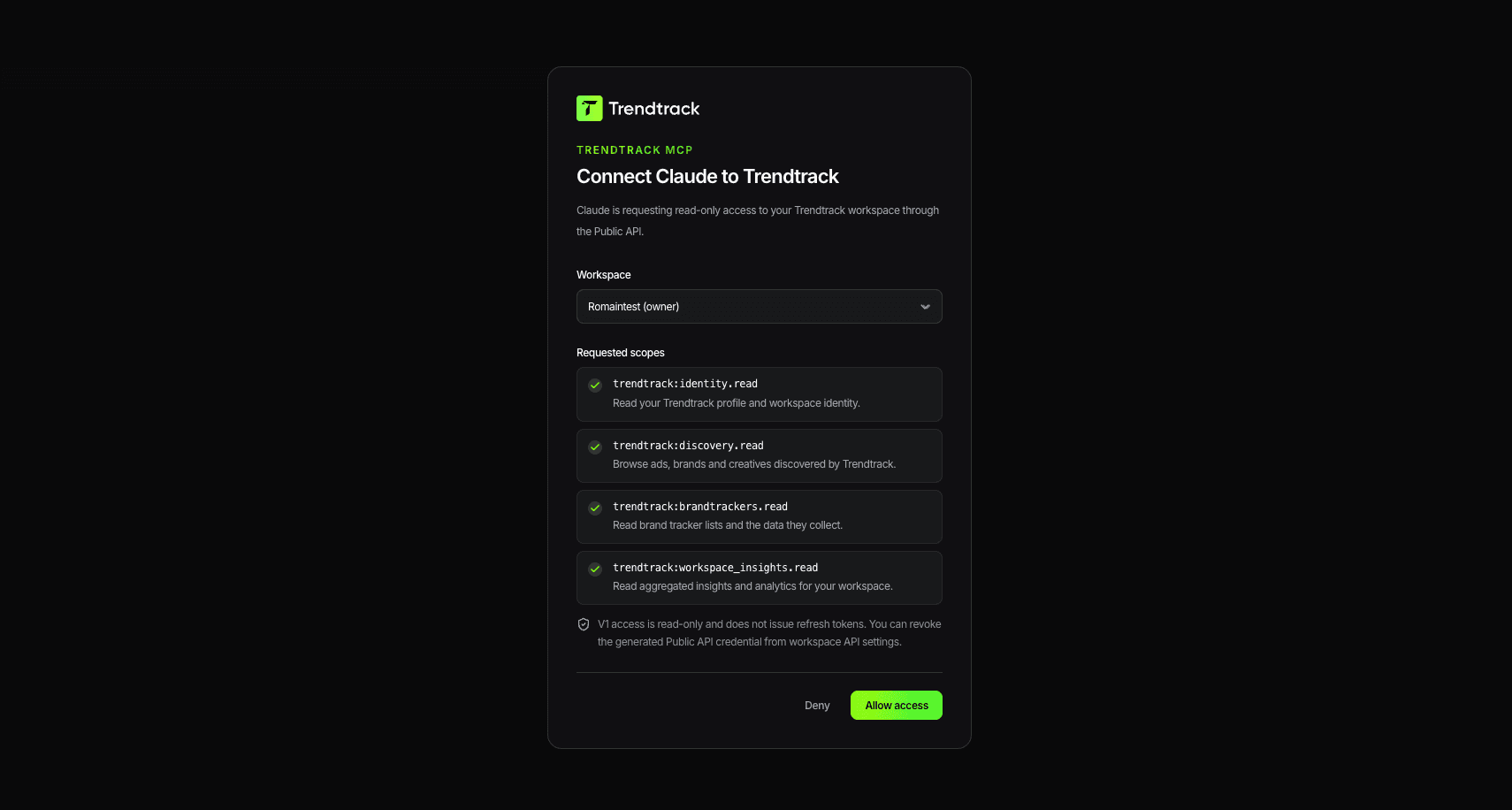
On Trendtrack, click Allow access to complete OAuth.
Test the connection with a quick prompt such as: Use Trendtrack to check my workspace and summarize which API tools are available.
Trendtrack is then available in Claude and Claude Desktop.
Example prompts
- Find Shopify stores selling skincare in France with active Meta ads and summarize any TikTok presence fields.
- Search TikTok library creatives for collagen gummies; include ads and organic videos.
- Look up this brand and summarize its current top Meta ads.
- Show my workspace's fastest scaling ads this week.
- Check remaining usage credits before running a large query.
For TikTok creative discovery, ask Claude to use search_tiktok_library. For shop questions, search_shops can include additive TikTok presence/count fields, but linked advertisers and /v1/ads* remain Meta/Facebook-only.
If you are mirroring the same workflow over REST, use the dedicated TikTok endpoints:
GET /v1/tiktok/library?search=collagen%20gummies&type=all&limit=10
POST /v1/tiktok/library/query {"search":["collagen gummies"],"type":"ad","status":"active","limit":10}
GET /v1/tiktok/library/tiktok_7078586231734521093
GET /v1/shops/3f8aa146-6f96-46e8-9781-64db5166f9a8/tiktok/library?limit=10
Brandtracker write examples
Once you approve the trendtrack:brandtrackers.write OAuth scope, Claude can manage tracked brands through MCP write tools. API-key MCP callers are workspace-authorized like REST API keys and do not use OAuth scopes.
Use Trendtrack add_to_brandtracker with domain "examplebrand.com" and folder_id 42.Use Trendtrack create_brandtracker_folder named "Q3 competitors", then move_tracked_brands with brandtracker_ids ["..."] and folder_id from the created folder.Use Trendtrack delete_brandtracker_folder with folder_id 42, action "move_to_default", confirm true. Only use action "delete_tracked_brands" when I explicitly want the tracked brands deactivated.Favorites write examples
The default OAuth grant includes trendtrack:favorites.read so Claude can use list_favorites, and trendtrack:favorites.write for favorites MCP write/share tools. Write tools include create_favorite_folder, update_favorite_folder, set_favorite_folder_visibility, delete_favorite_folder, reorder_favorite_folders, add_favorite_item, move_favorite_item, remove_favorite_item, create_ad_share_link, and create_favorite_folder_share_link.
Use type: "ads" | "shops" | "emails"; shops means website/shop favorites. scope defaults to workspace, while personal requires delegated-user authorization. Destructive tools such as delete_favorite_folder and remove_favorite_item require confirm: true.
Use Trendtrack create_favorite_folder with type "shops", name "Competitor shops", then add_favorite_item with type "shops", item_id "...", and folder_id from the created folder.Use Trendtrack delete_favorite_folder with type "ads", folder_id "...", mode "move_items_to_root", confirm true.Use Trendtrack create_favorite_folder_share_link with type "ads" and folder_id "...". Shops and emails are not shareable through MCP in this version.Favorite capabilities: ads support hierarchy, reorder, visibility, and share links; shops support flat folders and visibility but not hierarchy/reorder; emails support hierarchy, reorder, and visibility. Saved favorite IDs come from list_favorites: ads are numeric, shops/emails are UUIDs.
For public ad scaling prompts like “top ads leggings femme sur les 7 derniers jours”, ask Claude to use the generated POST /v1/ads/query 7-day scaling example (reachDelta7d, last7d, minReach: 1) rather than first-seen date filters.
Cost and safety notes
- Start with read-only discovery endpoints like
/v1/me,/v1/workspace,/v1/usage, and/v1/lookup. - Read/list metered endpoints consume credits per returned row; write/share mutations are usually fixed-cost one-credit calls.
- Brandtracker create/reactivate and destructive delete operations also check brandtracker mutation quota and active tracker slots before committing changes.
trendtrack:favorites.readis part of the default OAuth grant forlist_favorites;trendtrack:favorites.writeis opt-in and required only for favorites write/share tools. API-key MCP callers rely on REST-style workspace authorization.- Destructive MCP tools require
confirm: true; bulk and folder destructive operations count as one persistent create/delete quota operation while reporting affected counts. - See Credits & Billing and Rate Limits before running large queries.
Troubleshooting
- Connector can't connect: confirm the MCP URL is the canonical extension-server
/v1/mcpendpoint:https://api.trendtrack.io/v1/mcp. - Claude can't access workspace data: reconnect the connector and complete OAuth again.
- Unexpected credit usage: ask Claude to check usage first and run smaller limits.
- 429 rate limits: wait and retry according to Rate Limits.
Next steps
Utiliser Trendtrack avec n8n
Pilotez la Public API Trendtrack depuis le node HTTP Request de n8n — setup, recettes par endpoint et dix workflows prêts à importer.
Utiliser Trendtrack avec ChatGPT
Connectez ChatGPT à la Public API Trendtrack via l'endpoint MCP distant de Trendtrack pour analyser en direct les marques, publicités, shops et données d'espace de travail.